NewAndroid closed test is open

The workout tracker for iPhone

Did you train
enough?

Gryper tells you, muscle by muscle. Log every set in one tap and watch your week build on a living muscle map, graded against the volume each muscle needs to grow.

Free on iPhone · No account needed to start · Android beta →

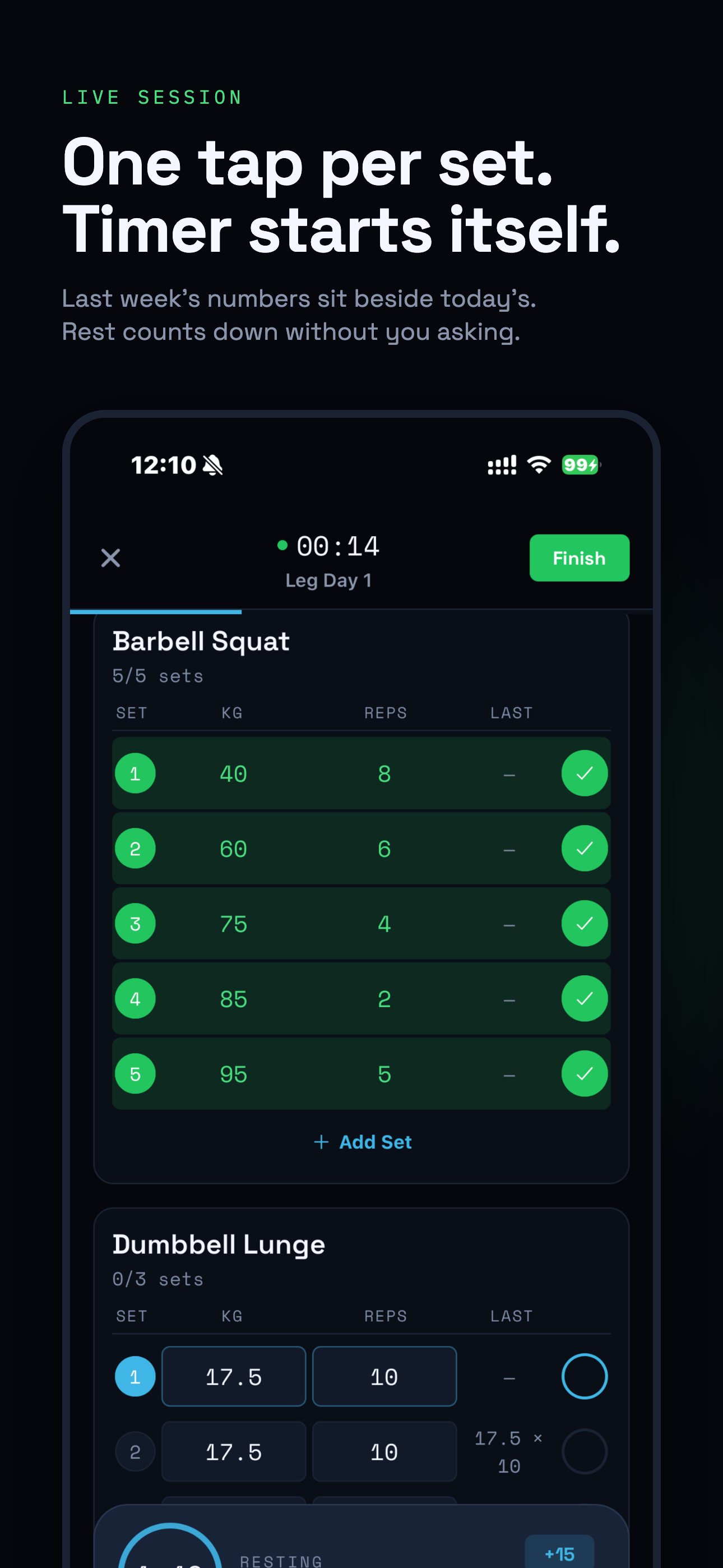
Gryper live workout: barbell squat sets logged with one tap, last session’s numbers beside each set, and the rest timer running
exercises, each mapped to the muscles it trains
170+
muscle groups on the front and back map
36
to log a set, with last session beside it
1 tap
of signal needed. Syncs when you’re back
0 bars

01Log

Log the set. Move on.

One tap per set. Last session’s weight and reps sit right beside today’s, so you know what to beat before you unrack. The rest timer starts on its own.

  • One tap per setWeight and reps pre-filled from your plan. Tap the check and keep moving.
  • Last session, right thereSee what you lifted last time beside every set, so you know what to beat.
  • Rest timer starts itselfIt starts when you log the set. No fiddling with your phone between sets.
Chalked hands sliding an iron plate onto a barbell

Barbell Bench Press

0/4 sets

In progress
SetkgRepsLastDone
  1. 180877.5 × 8
  2. 285682.5 × 6
  3. 387.5585 × 5
  4. 490487.5 × 4

Resting

2:00

Started on its own.

No signal

3 sets saved on your phone

  • Romanian Deadlift3 × 8 · 100 kgSaved
  • Leg Press4 × 12 · 180 kgSaved
  • Seated Leg Curl3 × 12 · 45 kgSaved

Flip airplane mode to try it.

02Offline

No signal? Keep lifting.

Basement gym, dead zone, airplane mode. Every set saves on your phone and syncs the moment you’re back online. Nothing waits on a spinner.

03See

See the pattern. Muscle by muscle.

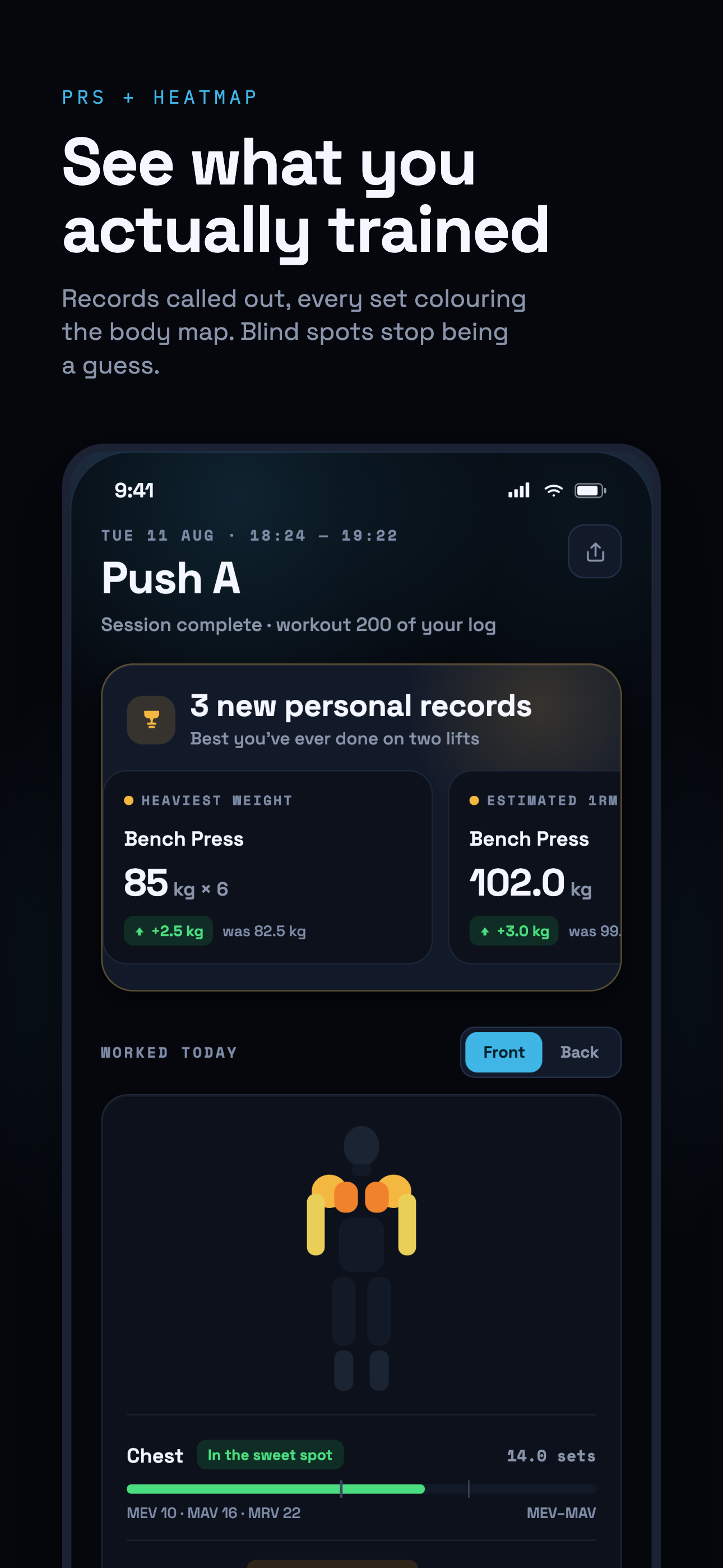
Every set lights the muscles it trained. Over the week, each one is graded against its volume landmarks: MEV, the minimum that drives growth; MAV, where most lifters grow best; and MRV, the most you can recover from.

AbsChestUpper ChestQuadricepsBicepsForearmsDeltoidsFront DeltoidChestUpper ChestQuadricepsBicepsForearmsDeltoidsFront Deltoid
Front
LatsRhomboidsTrapeziusLower BackGlutesHamstringsCalvesTricepsRear DeltoidLatsRhomboidsTrapeziusLower BackGlutesHamstringsCalvesTricepsRear Deltoid
Back
  • Worked today

Push day · 0 sets

  1. 1Barbell Bench Press4 sets
  2. 2Incline Dumbbell Press3 sets
  3. 3Overhead Press3 sets
  4. 4Cable Lateral Raise3 sets
  5. 5Cable Triceps Pushdown3 sets

04Know

Know how it went, before you leave the gym.

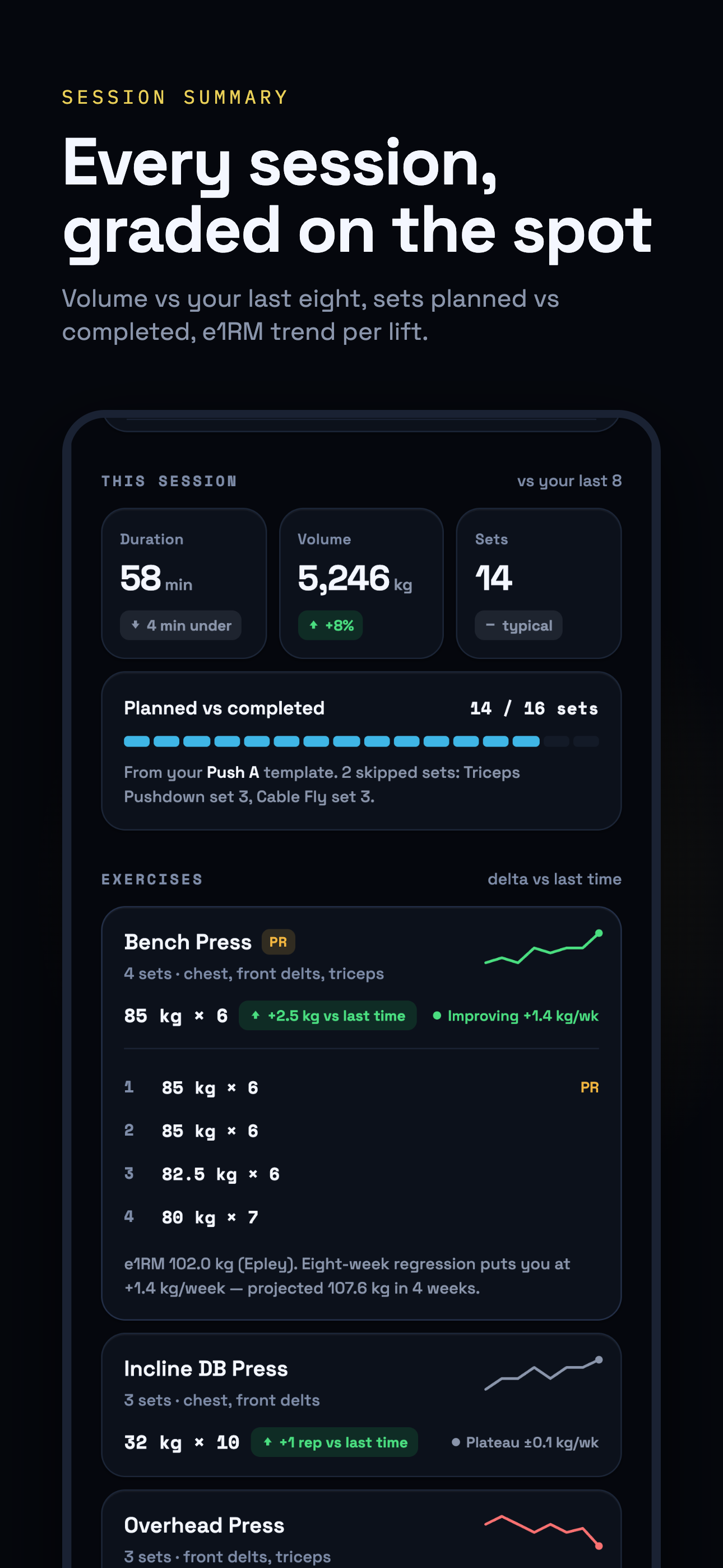
Each session is graded against your last eight. Every lift tracks its estimated one-rep max. Records get the gold.

New personal record

Bench press · 102.0 kg e1RM

90 kg × 4, up +2.8 kg on your previous best. Called out the moment you finish, with one gold flash and nothing else.

Session grade

Volume +17% vs your last eight

8 sessions agoToday

Today’s session volume was 7840 kg, 17% above the average of the previous eight sessions.

Strength trend

e1RM 95 → 102 kg in ten sessions

Estimated one-rep max (Epley). Gold marks your best.

05Repeat

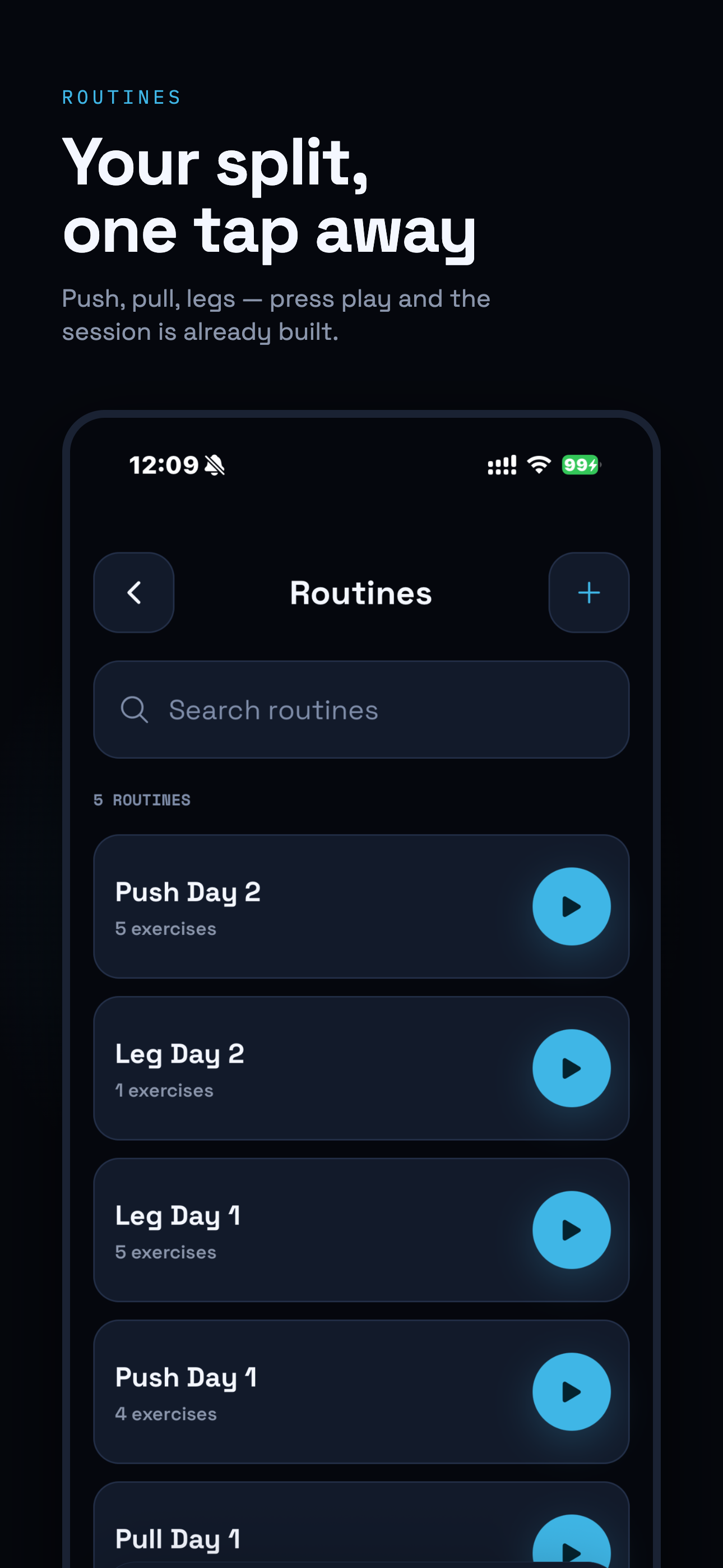
Build your split once. Press play.

Push, pull, legs, or whatever you run. The next session is ready before you walk in.

  • Push

    5 exercises · ~55 min

    • Chest
    • Shoulders
    • Triceps
  • Pull

    6 exercises · ~60 min

    • Lats
    • Rhomboids
    • Biceps
  • Legs

    5 exercises · ~65 min

    • Quads
    • Hamstrings
    • Glutes

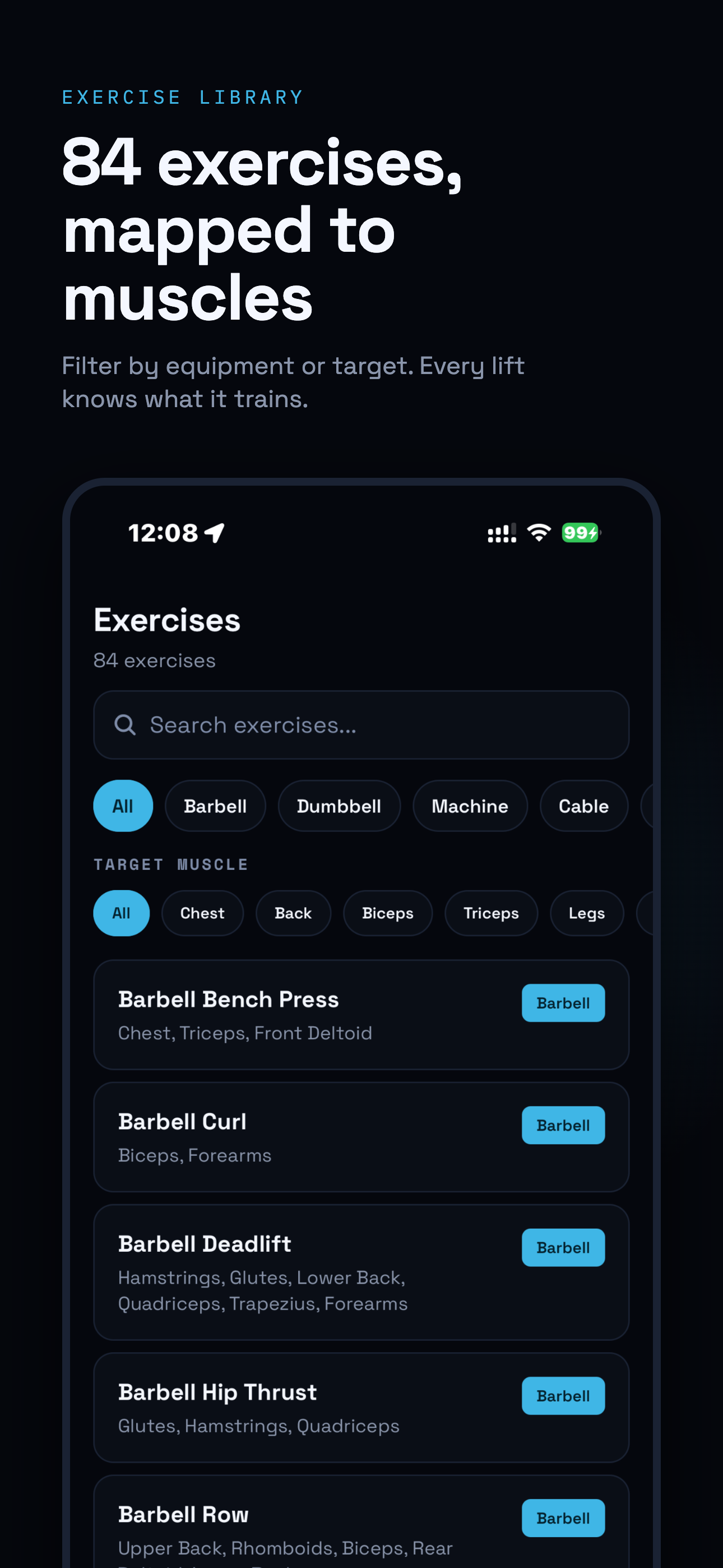
170+ exercises, each mapped to its muscles.

Filter by equipment or target muscle. Add your own and it lands on the map the same way.

  • Barbell Bench Press
  • Romanian Deadlift
  • Lat Pulldown
  • Bulgarian Split Squat
  • Cable Fly
  • Arnold Press
  • Hack Squat
  • Face Pull
  • Hammer Curl
  • Seated Cable Row
  • Leg Extension
  • Pec Deck
  • Barbell Squat
  • Pull-Up
  • Incline Dumbbell Press
  • Seated Leg Curl
  • Cable Lateral Raise
  • Barbell Hip Thrust
  • T-Bar Row
  • Standing Calf Raise
  • Close-Grip Barbell Bench Press
  • Hanging Leg Raise
  • Goblet Squat
  • Dumbbell Rear Delt Fly

06Inside the app

The whole app, nothing extra.

  • Routines list for push, pull and leg days, each ready to start with one tap
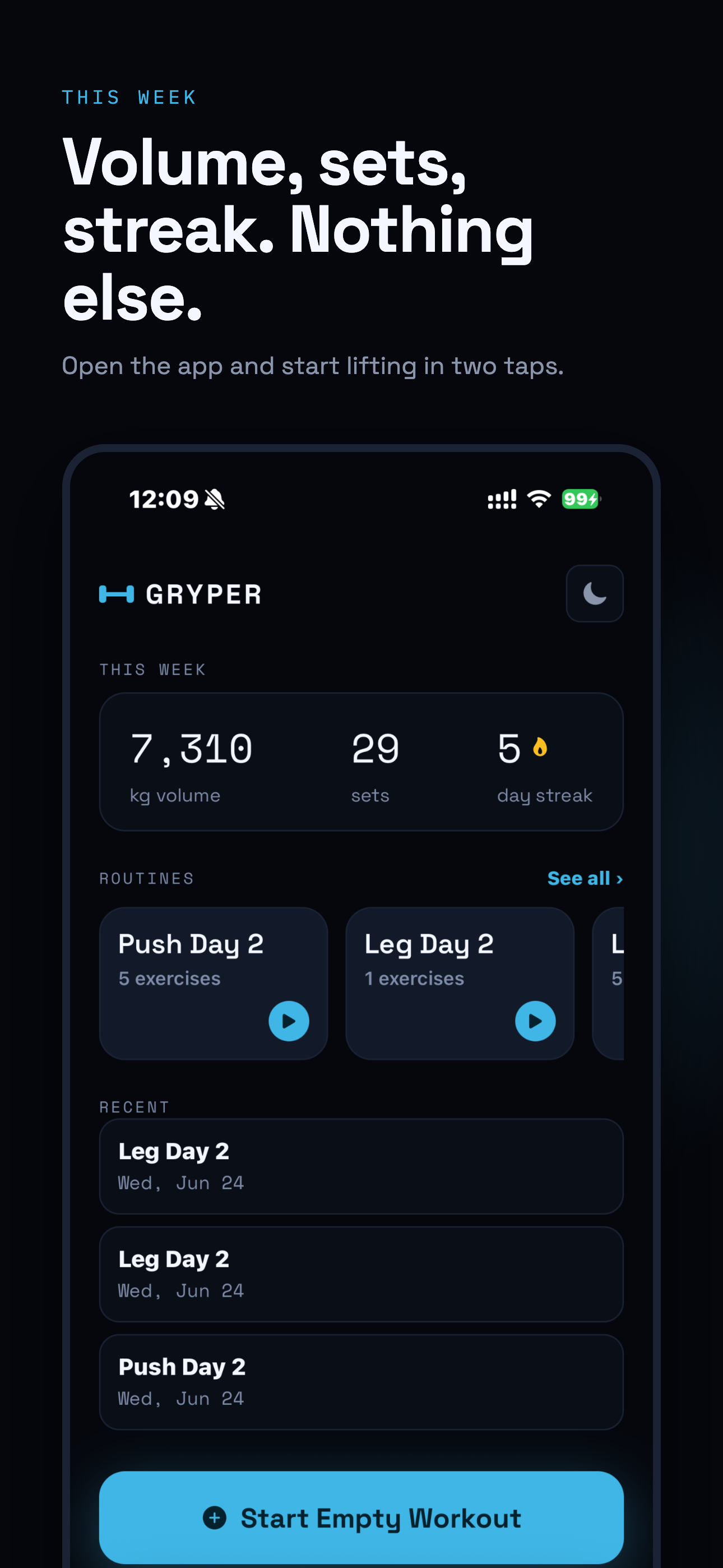
  • Home screen with this week’s volume, sets and streak, routines and recent workouts
  • Session summary with three new personal records and the muscle heatmap of everything trained
  • Session grade comparing duration, volume and sets with the last eight workouts
  • Exercise library filterable by equipment and target muscle

07Yours

Your training, never trapped.

Take your history anywhere, any time. Switching from another app? Bring it with you.

  • Spreadsheet CSV

    Every set of every session, one row each. Open it anywhere.

  • JSON archive

    Your complete history in one file, for safekeeping.

  • Import from Hevy

    Bring your past workouts with you from a Hevy CSV export.

08AndroidClosed test open

Lift on Android? Help us ship it.

Gryper is on iPhone today. Android is in closed testing, and Google needs real lifters training with it for two weeks before it can launch.

The first 20 testers get Gryper Pro free for 12 months when it launches, if they stay opted in for the full two weeks. Pro isn’t out yet; the year is added to your account at launch.

  1. 01Sign upUse the Google account that’s signed in to the Play Store on your phone.
  2. 02Install the test buildIt comes from Google Play, like any other app.
  3. 03Train with it for two weeksLog your sessions and tell us what broke, what felt slow, what you’d change.
Gryper on Android: the weekly muscle heatmap, with hamstrings flagged below MEV

09Questions

Asked at the rack.

What is Gryper?

Gryper is an iPhone workout tracker for lifters. You log every set in one tap; Gryper maps each set onto an anatomical muscle heatmap and grades your weekly volume for every muscle against MEV, MAV and MRV, so you can see whether you trained enough, hit the productive range, or pushed too far.

How does Gryper tell me if I trained enough?

Every set you log counts toward the muscles that exercise works. Gryper adds those sets up per muscle for the week and compares the total with three volume landmarks: MEV (minimum effective volume), MAV (maximum adaptive volume) and MRV (maximum recoverable volume). Below MEV means that muscle probably didn’t get enough work; between MEV and MAV is the productive range; past MRV is more than most lifters can recover from. The landmarks are research-based starting points, not guarantees, and the map shows the result at a glance.

What do MEV, MAV and MRV mean?

They are weekly set ranges per muscle. MEV is the fewest hard sets that still produce growth. MAV is the range where most lifters grow best. MRV is the most you can do and still recover. Gryper uses published defaults for each of its 36 muscle groups.

How does the muscle heatmap work?

Each exercise in the library is mapped to the muscles it trains. When you log a set, those muscles light up on a front and back body map: after a session it shows what you worked that day, and across the week it colours each muscle by where its volume sits against MEV, MAV and MRV.

Does Gryper work offline?

Yes. You can log a whole workout with no signal. Sets are stored on the phone and sync to your account when you are back online.

Is Gryper free?

Gryper is free to download on the App Store, and you can start logging without creating an account.

Is Gryper on Android?

Gryper is on iPhone today (iOS 16.4 or later). The Android version is in closed testing, and you can sign up to test it at gryper.fit/android. The first 20 testers who stay opted in for the full two-week test get Gryper Pro free for 12 months when it launches.

Can I export my workouts or move from Hevy?

Yes. You can export your full history as a spreadsheet CSV or a JSON archive, and you can import a CSV exported from Hevy to bring your past workouts into Gryper.

How is Gryper different from other workout loggers like Strong or Hevy?

Gryper is built for lifters who want fast logging and a muscle-level answer to “was that enough?”. On top of sets, reps and records, it maps every set onto a muscle heatmap and grades each muscle’s weekly volume against MEV, MAV and MRV.

Your next session

Stop guessing.
Know it was enough.

Free on iPhone. Log your first set in seconds, no account needed.